MoneySlinger™ is Back In Town
with New Features and Faster Than Ever!
MoneySlinger™ is a low-tech, high-productivity money management system built around its proprietary Cashflow Method™ — a year-long cashflow optimization methodology.
What Does MoneySlinger™ Do?
MoneySlinger™ neutralizes cashflow volatility, allowing you to systemize and automate your cashflow – so you can "once-and-for-all" systemize and automate your decision making.
~ Open for Private Beta ~
Register Above to Join!Participate in the early release to earn a free account.If you're a former The B Word™ or MoneySlinger™ client,email for a 50% OFF coupon.90 day free trialsAnnual subscription pricing: TBD~ Public Release Fall 2026 ~
Traditional/Zero-Based Budgeting Systems Do Nothing To Control Your Cashflow
There is no attempt to synchronize incompatible weekly, bi-weekly and monthly timelines or highly-variable incoming and outgoing savings & expense amounts.
“Disorder" is the natural state of your cashflow, making control of highly-interconnected, asynchronous financial streams overwhelming.
Complexity and unpredictability – all in penny-driven detail – is a chronic condition you've probably just come to accept, or don’t even know you have.
You'll find that traditional money management failure is not so much from lack of effort – but from simple exhaustion.
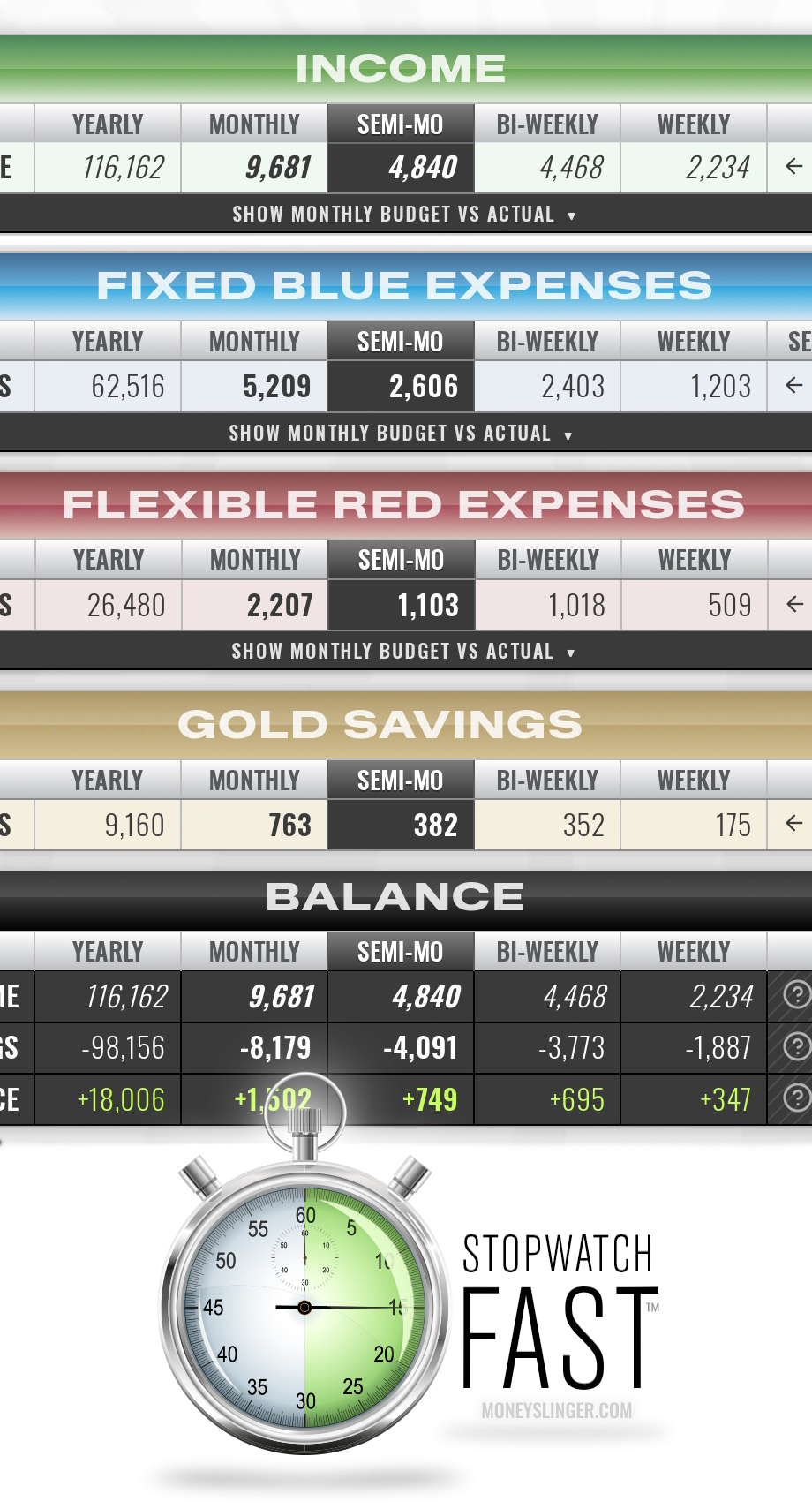
By contrast, MoneySlinger™ is an alternative, "running-average" based system, calculated year-long, that counters individual, unpredictable and highly-variable cashflows, by combining and converting all these incoming and outgoing cashflow streams into:
Only 4 CATEGORIES
Only 4 KEY FIGURES
Managed only 2-TIMES/MONTH
Using only 1 MASTER CALCULATION
Consolidating, Averaging and Containment –
It’s the Envelope Method on Steroids
Investment firms call it the "Portfolio Effect". It's what happens when you group multiple, variable streams into a single containment pool; so individual fluctuations offset one another.
QUESTION: Why would you prefer to try to control everything individually – and randomly – all your life?
MoneySlinger™ sorts and combines all independently-variable outgoing expenses into three simple categories:
FIXED BLUE EXPENSES: These are your core/fixed operating expenses.
FLEXIBLE RED EXPENSES: These are your discretionary operating expenses
GOLD SAVINGS: These are your short term holding/savings.
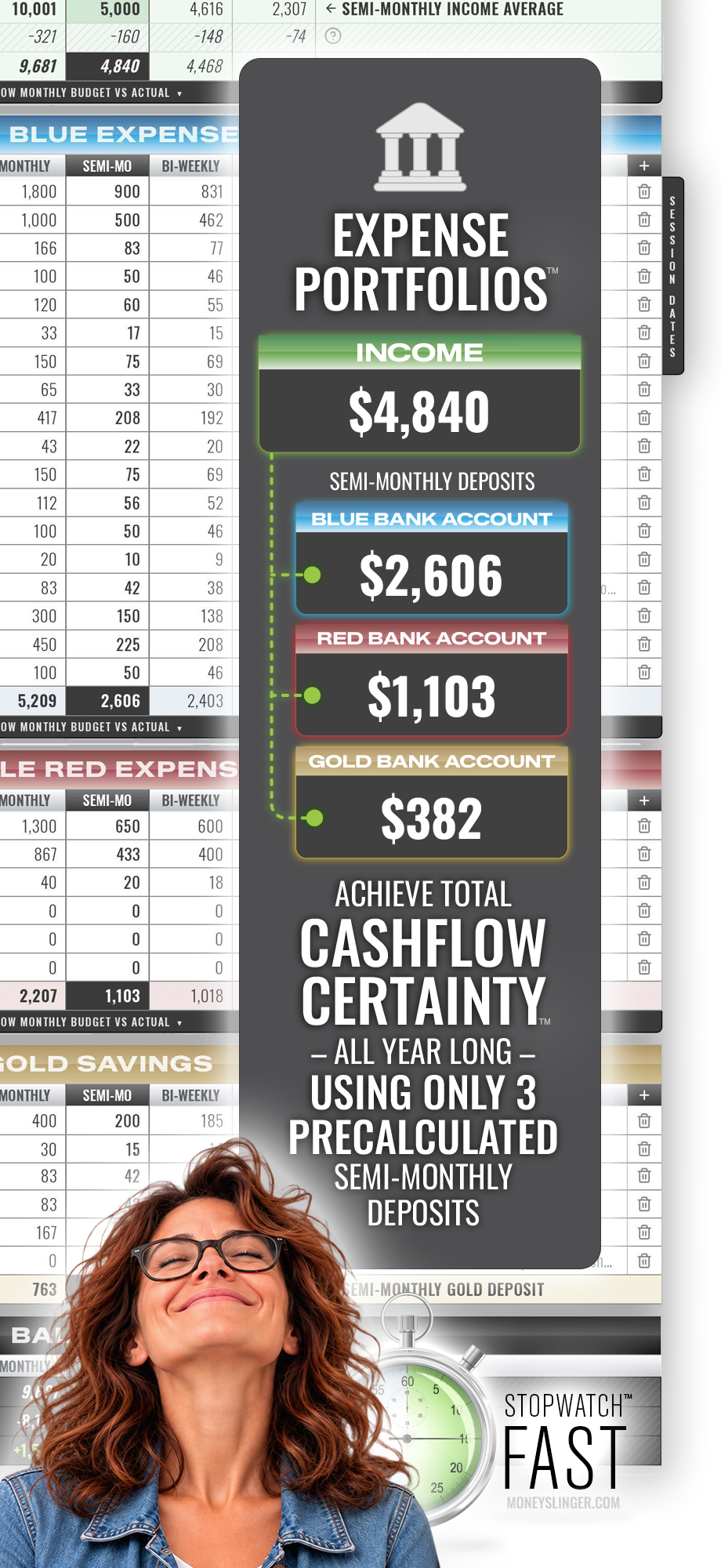
You give each category its own dedicated bank account that turns each into its own self-balancing "Expense Portfolio™."
You fund and manage these 3 accounts in whole with one, predetermined, "average", semi-monthly deposit.
Aware now, that your seasonally high fall expenses are already averaged into every deposit you make – all year long – where surpluses can accumulate and shortfalls are covered, because your balances carry over month-to-month, effortlessly maintaining your incoming and outgoing cashflow averages throughout the year.
If You Love Bean Counting –
You're Going to Hate MoneySlinger™
Because there's even less to do – only twice a month
RULE #1 regarding income management: Regardless of when someone pays you – you pay yourself on your own schedule.
MoneySlinger systemizes all your income, deposits, bill paying and tracking activities into 2, formal, predictable, recurring, semi-monthly Session Dates™ (S1 & S2).
Start Your Watch!
STEP 1 Track your income, then allocate and balance your 3 deposit amounts inside MoneySlinger™. Physically make/adjust your bank deposits, as normal, funding your 3 Expense Portfolios™.
STEP 2 Inside MoneySlinger, track your real/actual BLUE Expenses – due only in that Session – and physically pay these BLUE expenses, as normal, from your BLUE bank account.
Stop Your Watch! 15 min? Your BLUE, RED and GOLD portfolios have been funded and bills paid. You've financially set yourself up until the next Session. MoneySlinger calculates and compares your actual vs budget averages YTD.
STEP 3 Now, in between Sessions, you simply collect and hold any new income until your next Session, and live ONLY out of your Flexible RED account. Read below for details.
The All-Powerful Flexible Red Account
The Red Account has captured 100% of your discretionary spending. That's the highly-volatile and largely unpredictable 20% of your cashflow – responsible for all the chaos in the other 80%.
Video demonstration: The MoneySlinger Flexible Red Account mobile budget tracker – digital envelope budgeting without envelopes. Tap an amount, pick a tag, and your Session balance and budget updates instantly.
Your Cashflow Plan Stays Home!
What happens to your state-of-mind when you actually reach Cashflow Certainty™ – when, despite volatility, virtually a 100% of your operating expenses, savings goals and deposits have already been preconfigured for the entire year – and your routine Sessions have become a psychological finger snap?
Suddenly, tracking how much you spend on coffee this week vs last week becomes irrelevant...and a whole lot more.
Profoundly, all that matters now is PACING — or never letting your RED spending outpace your Session balance - before the next Session Date™ deposit.
MoneySlinger's mobile Red Account Tracker keeps you aware of: 1) your RED Balance, 2) the Days Left Until Next Session and 3) Average Amount/Day left – easily guiding your decision making.
And to not forget, come your next Session date, any surplus in your RED account carries over – and is added to your next Session Date™ balance!
MoneySlinger™ FAQ
What's with the gunslinger cartoon? Isn't money management supposed to be serious business?
Because MoneySlinger™ is far more than a "serious budgeting app" – it's a life hack. We're way past the mechanics of budgeting and paying bills on time.
The rebel gunslinger (and his effortless gun slinging skills) represents the psychological after-effect of not only escaping the time-and-energy-sucking-hell-hole of traditional budgeting and money management – but successfully achieving Cashflow Certainty™
Cashflow Certainty™ is the empowering "feeling" you get when you've turned your "serious" 5D-money-management-chess-game – into checkers – and you already know all the moves a year in advance – and there's only 4.
More then unburdened...you're liberated. Only then will you understand "money slinging" with joy and a smile on your face.
The rebel character not only represents one's "alter-ego" after breaking out – it's also a fun poke at the "serious" multi-million dollar money management industry, and the mismatched calendar systems we've created for ourselves that the industry builds itself upon, that leaves it all up to you to constantly track and manage unfolding cashflow disorder.
"Serious"...is when you've had enough – and you hack the system.
Admittedly, some people can't intellectually escape. They cannot disassociate "burdensome" from "serious".
Will MoneySlinger™ run on my computer and mobile phone?
Yes. MoneySlinger™ is a low-tech/high productivity, browser-based application. It will run in any browser. There are actually two different applications: 1) the larger desktop "parent" app, used to develop your master Cashflow/Budget Plan and income, deposit and expense figures and your Semi-Monthly Session Dates™. The parent app can only be accessed on larger devices such as a computer or a tablet because of the larger annual worksheet views.
And 2), a secondary, "child" browser-based mobile app, used ONLY for mobile RED tracking of discretionary spending associated with your Flexible RED account – that communicates with your "parent" desktop app.
Does MoneySlinger™ connect to my bank accounts?
No. MoneySlinger™ is a totally different animal, and has no need to connect to your financial institutions or handle your credentials. It would only slow you down. Regardless, your account "digits" are still encrypted. You make your deposits and pay your bills exactly as you always have.
The difference is, MoneySlinger™ systemizes and consolidates all your cashflow streams, that simplifies your entire cashflow process.
How can MoneySlinger™ take me less time if it doesn't sync and exchange data with my bank?
Not having to connect and sync with third party financial institutions removes technical, privacy and financial security issues...that saves frustration, time and concern.
MoneySlinger™ has no need to connect to your financial institutions, because MoneySlinger™ eliminates the need for daily, penny-level accounting responsibilities. It removes the drudgery and focus of having to track and control countless, individual and volatile expense items – in penny-level detail – toward managing your 3, Semi-Monthly Expense Portfolio™ balances.
MoneySlinger™ leaves all that penny-level tracking detail to your 3, dedicated debit/credit institutions – that are paired to your 3, BLUE/RED/GOLD dedicated "Expense Portfolio" accounts – should you ever need it.
By doing so, without any additional effort, you're automatically categorizing, containing and recording every penny. On the MoneySlinger™ side, you're removing the need to record the loose change from any and ALL tracking efforts.
What was 87.25 or 87.95 or 87.60 – is now 88 – that easily cuts your tracking effort by virtually 50% that not only massively unclutteres your budgeting/tracking worksheets – but your brain. Your attention now refocuses on your consolidated 3 account deposits and balances.
Further, your Fixed BLUE Expenses account and Gold Savings accounts are only attended to twice a month, and in only a few minutes during your routine Semi-Monthly Sessions on your desktop app.
Even further, each of your 2, Semi-Monthly Sessions activities are virtually "predetermined" and are virtually "the same every Session". You're decision making is minimal...so your Sessions become routine, profoundly effortless, empowering and even delightful.
Each Session sets you up financially until the next Session.
In between your Sessions, your only concern now is monitoring your discretionary spending in your Flexible RED account using your RED Account Mobile Tracker – using again – only whole numbers.
As you spend, the RED Mobile Tracker reveals to you 1) your running Session Balance 2) the Days Left before your next scheduled Session Deposit and 3) the Average Amount/Day Left. PACING your spending is now your primary concern...not pennies.
MoneySlinger™ provides an easy way to keep your Cashflow/Budget Plan balances in sync with your actual bank account balances during each of your Semi-Monthly Sessions.
Do I have to change the way I pay my bills?
No. Your bills are paid the same way you pay them today — but as you begin to recognize your cashflow patterns, you will most likely begin to see ways to reduce your bill paying activities by consolidation...and even earn points in the process.
How much time does MoneySlinger™ take?
Typically about 15 minutes, twice a month, on your Semi-Monthly Session Dates. MoneySlinger™ will help you determine the most ideal Sessions dates, based on your BLUE monthly expense due dates. They're not hard dates, but flexible. If one of your Session Dates falls on a Friday...you might be busy and wait until Sunday when it's more convenient. You'll know – because every Session 1 contains the same activity and every Session 2 contains the same activity – that includes the same calculation.
What is the difference between a Cashflow Plan and a Budget?
A traditional "budget" is a static, income vs expense plan. A MoneySlinger™ "cashflow plan" contains a budget plan – but is also a physical step-by-step "executable plan of action" to maintain your budget plan. It synchronizes, systemizes and automates your physical cashflow streams, amounts and calculations, requiring far less time and effort – and far less decision making – to maintain control over your financial affairs all year long.
Traditional/zero-based budgeting methods offer no plan of action to manipulate cashflow, asking you to randomly track, add and subtract cashflow disorder – which is why most people get burned out. The MoneySlinger Cashflow Method™ is an active cashflow/budget plan that does both.
Does MoneySlinger™ have a Demo Cashflow/Budget Plan?
Yes. Every MoneySlinger account comes with a "Sample Cashflow/Budget Plan" inside it. It's a read-only "typical" reference Cashflow/Budget Plan that includes sample tracking data to mid year – so you can see how an entire MoneySlinger™ Cashflow/Budget Plan calculates and works.
How Do I Make a Budget?
The easiest way to start a new budget plan is by making a copy of the Sample Cashflow/Budget Plan already in your MoneySlinger™ account. You can have as many budgets plans as you like and can share access with a partner.
STEP 1: Clone the Demo/Sample Budget
Open the Sample Cashflow/Budget Plan in your account and choose "Save Current Budget As..." from the menu and rename it. This will clone the entire Sample Cashflow/Budget Plan that will include all tracking data. This is now a fully working copy and completely editable. The original Sample Cashflow/Budget Plan always stays in your account for reference. Now you can easily edit the items and figures in your new budget and easily see and understand what calculating averages does to help you "see through" your cashflow variability.
STEP 2: Clear the Sample Tracking Data
With your newly copied plan open, choose "Clear/Reset All Tracking Data" in the menu. It will clear and ready all your Tracking Worksheets. All the existing "Demo" ending balances for each item in the Gold account will be moved to "Previous Balances" to start your budget year. You can edit these figures as you see fit to match your real starting balances.
* Note that clearing your Tracking Worksheets WILL NOT clear your "Cashflow/Budget Worksheet" master plan. Your Cashflow/Budget Worksheet always stays intact. This is the exact same procedure you would use at year end, when starting a new year.
STEP 3: Make Your Cloned Sample Cashflow/Budget Plan Your Own
If you have questions along the way, note that all Worksheets have context-sensitive popup helper cards throughout the application.
Ready? Now it's time to untangle your cashflow chaos, discover your 3 average monthly operating expenses and develop an executable budget plan-of-action.
INCOME: Edit/Add your income sources, estimated amounts, and pay schedules (click the icons for field-by-field help.)
BLUE EXPENSES: Edit/Add and itemize your "fixed" (must have) expenses and estimated amounts in the Fixed BLUE Expenses section. Check the AP box if AutoPaid and select each items due dates.
Sort by Due Date: Sort your BLUE Expenses by due date into chronological order by dragging and arranging them top to bottom.
Default Session Selection: Set the top half of your BLUE expenses (Due 1st-15th) to Session 1 (S1), and the bottom half of the month to Session 2 (S2). These are your default Session starting points. These selections determine which Semi-Monthly Session these expenses show up on in your Fixed BLUE Tracking Worksheet – that determines which expenses get paid at each Session.
RED EXPENSES: Itemize and loosely breakdown and estimate your Flexible RED Expenses. Note your individual line-item expenses in the RED account are not necessarily tracked individually. Your immediate goal is to determine an average lump sum that you need for your everyday discretionary/flexible spending.
GOLD SAVINGS: Itemize and loosely estimate your savings goals. Your GOLD savings items are tracked individually.
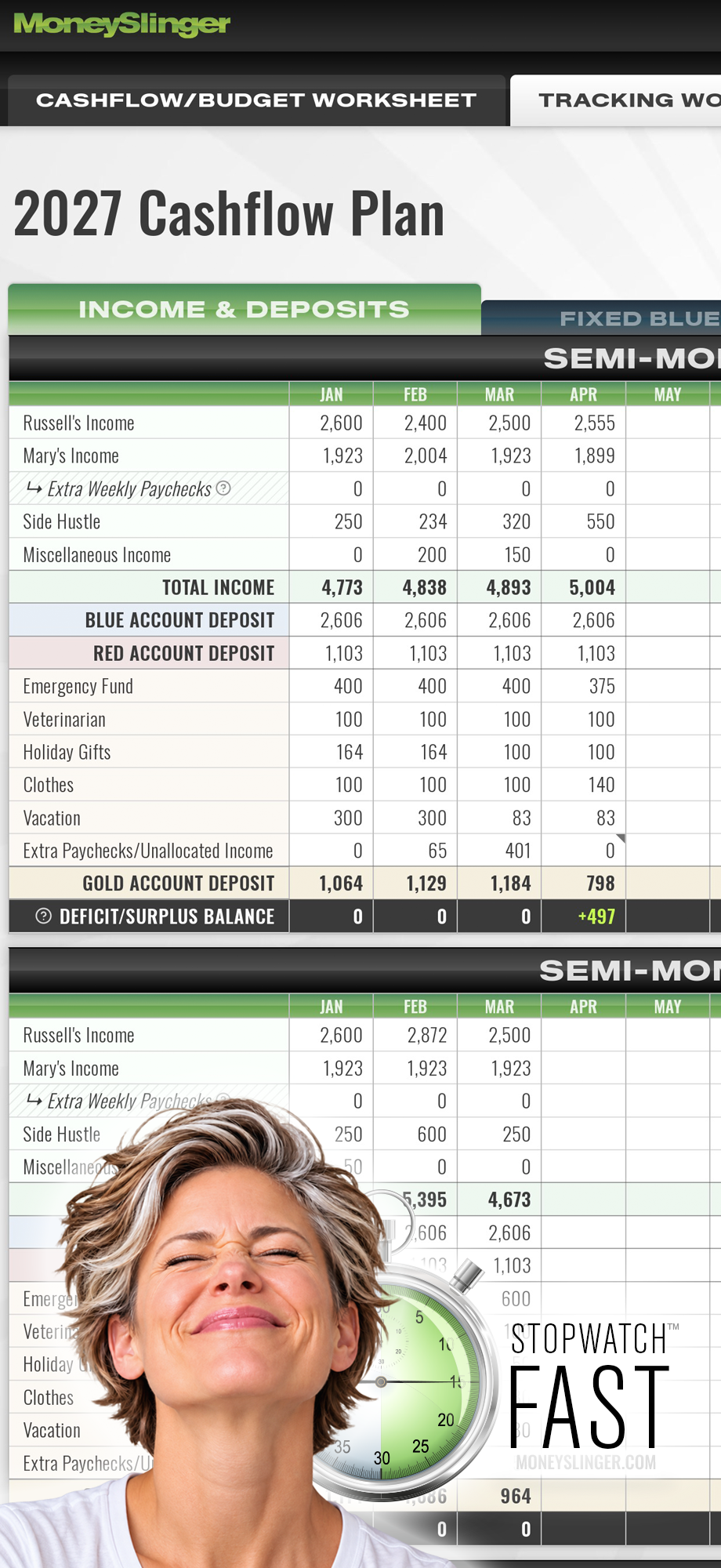
BALANCE YOUR CASHFLOW/BUDGET WORKSHEET: Once you have your Cashflow/Budget plan roughed in, view your Total Semi-Monthly Balance figure at the bottom of your worksheet – that will either be negative or positive. Adjust your bills, debt pay-down, discretionary spending and saving goals where you can – to get your Cashflow/Budget plan to Balance close to zero or above. It does not have to exact.
FINE TUNE YOUR 2 SESSION DATES: Click on the SESSION DATES tab on the right side of your Fixed BLUE Expenses section. The CASHFLOW SCHEDULE chart will appear – showing something you've probably never seen before; that's your monthly expense payment schedule displayed over a month's time, revealing how the due dates for all your Fixed BLUE Expenses collectively fall each month. It also shows you the 20 day window before each is due – in which you'll have them in hand and manageable.
Click the icon in the chart for detailed explanation.
When starting out, a few bills might have to be handled outside your normal Session dates, but they can easily be handled on their own time until you establish your Session routine. It does not change your deposit figures or any other part of your plan. These dates are "soft" reference dates and can be changed at any time.
Session Day Deposits and Payments: Note on the CASHFLOW CHART also shows you your S1 & S2 payout totals. Either the first or second half of each month will have a larger expense payout then the other – all year long. This is normal, to note regardless, your "average" deposit amount stays the SAME for both Session 1 & 2 – all year long – because it's being deposited into your dedicated Expense Portfolio™.
When beginning to put your cashflow plan in action, start on the Session Date with the SMALLER payout. This will leave a positive balance in your dedicated BLUE account for the next Session's LARGER payout.
It's also a good idea to "pad" your BLUE account with a base amount, so your normally fluctuating BLUE balance does not get near zero. The dedicated account is meant to fluctuate Session to Session and absorb temporary variability.
DEDICATE 3 BANK ACCOUNTS: Physically set up your 3, dedicated bank/checking accounts, preferably at the same bank allowing fast/easy account transfers. Label them as BLUE, RED and GOLD. The GOLD account should preferably be interest bearing. Get Debit Cards for each of these 3 accounts (can be used for auto-pay options too) – and label them. If you prefer, you can use credit cards (and earn points).
YOUR EXECUTABLE BUDGET PLAN: Your Cashflow/Budget Worksheet is completed and not only reveals your consolidated "budget plan" – but your routine "executable plan-of-action", revealing your 3, routine BLUE, RED & GOLD "Expense Portfolio" deposits, to be deposited into your 3, dedicated BLUE, RED & GOLD bank accounts during your 2 Session Dates™ each month.
What is the 50/30/20 budget rule, and does it work?
The 50/30/20 is an arbitrary rule that splits after-tax income into 50% needs, 30% wants and 20% savings or debt payoff. It's a general starting ratio. It all depends on your personal priorities and can be anything you desire it to be.
How do I stick to a budget?
Make it easy. Beyond a "budget plan" with "static" figures, you need an "executable cashflow plan-of-action" to control and standardize your incoming and outgoing cashflows. MoneySlinger™ combines and averages individual cashflow streams – into only 4 streams that eliminate unnecessary tracking details. This addresses the underlying reason good-faith budget attempts fail: exhaustion. Not from lack of effort.
How do I budget with irregular or variable income?
The antidote to managing and controlling income (and expense) variability – is "averaging". MoneySlinger’s Cashflow/Budgeting System is a system built on "averaging" and the answer for that exact problem.
How do I budget paycheck to paycheck?
You don't budget paycheck to paycheck, you budget for the entire year, taking into consideration all seasonally high and low expense and income, and then determine your "average" monthly income and expenses – and match or budget your life style to your average income and expenses. MoneySlinger™ solves the problem of incompatible weekly, bi-weekly and monthly timelines and paycheck-to-paycheck income fluctuations.
How much of my income should go to rent, groceries and bills?
As much as you determine there should be – and can be. In MoneySlinger™, using the Cashflow/Budgeting Worksheet makes it extremely easy to experiment with figures and balance your income vs living expenses to help determine this balance. More than a static budget, when you're done, you'll also have a flexible and executable deposit and cashflow plan.
What should I look for in a budgeting app?
By asking the questions: Does it actually solve the problems of money management? How much time and effort will it actually take to maintain? Budgeting (creating a plan) does not take much time at all. It's the ease and/or difficulty of trying to stay on the plan through the year, that determines your success – struggling to manage competing incoming and outgoing cashflow streams. That traditional budgeting apps do not even attempt to fix cashflows. MoneySlinger™ Cashflow Method™ addresses and solves this issue head-on.
How do couples and families budget together?
If you share goals, it's easier to reach them if you share and follow a common financial plan...one that unifies the core household cashflow objectives and responsibilities – but also one where each person still has some personal spending autonomy. Using MoneySlinger's Cashflow Method™, there are a number of ways to easily set this up, extending the dedicated expense account methodology. "Guest Access" is also a feature that allows the account holder to allow a guest 100% access to individual budgets, or to just the Flexible RED Account via the RED Mobile Tracker.
How do I budget while paying off debt?
Debt payoff should be part of your budget. Debt can only be paid off by using your cashflow surpluses – and you can easily determine your cashflow surpluses by first determining your "minimal operating expenses" using MoneySlingers™ Cashflow/Budget Worksheet.
How much should I save each month, and do I need an emergency fund?
When first getting your financial life in order, if you don't already have an Emergency Fund, surplus income should first be allocated to building up your Emergency Fund. This is easily doable as you build out your MoneySlinger Cashflow/Budget Worksheet. It may be 1% of your income or 50% – it doesn't matter. Try to cover at least 3 months of expenses, which MoneySlinger™ can determine for you. The faster you accomplish this the safer you are – and can then redirect surplus funds toward other goals. In MoneySlinger™, there is already an Emergency Fund line item in your GOLD Savings account, that will automatically be funded during each Session Deposit.
Join the Private Beta Group
Be first in line when MoneySlinger becomes publicly available — and earn a FREE account as a private beta tester. ~ Last revised 10/28/26 ~