
Session Tracking Activity (3 of 3):
Withdraw and Record Your Gold Expenses (if any)
Questions? Please email.
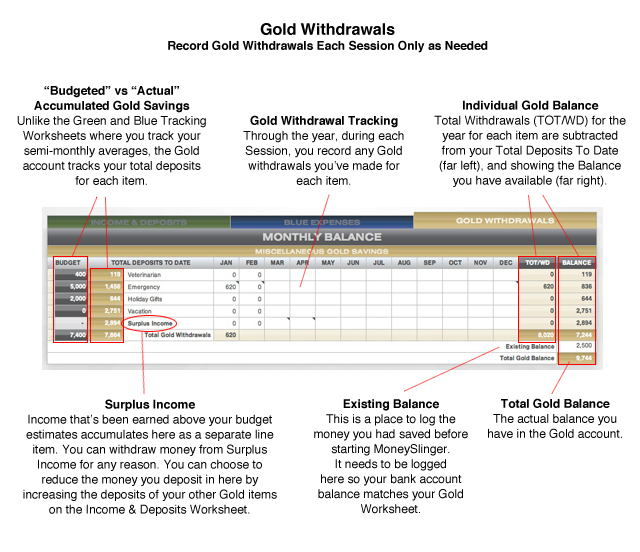
Our objective for the Gold Savings Worksheet is a little different than the Green and Blue Tracking Worksheets. We’re not interested in averaging your withdrawals from the Gold Account. While we may be averaging our deposits into the Gold Account, just like the Green and Blue Accounts, there’s no set, routine payout schedule that requires averaging here. We’re more concerned with 1: the accumulation of savings for each Gold item, and then 2: tracking how much you’ve spent of that savings for each item.
You may have noticed on the Income & Deposits Worksheet that we’ve tracked our Gold deposits into each Gold item separately, unlike the Blue or Red Accounts where we made one lump sum deposit. For the obvious reasons seen in the Gold Worksheet, we want to track our withdrawals from each Gold item’s deposit individually.
You’ll notice that, unlike the Green and Blue Worksheets, we moved the annual budget figures (black cells) to the left side of the Gold Worksheet. Note again these are not averages, but total sums taken from the Budget Worksheet.
Just to the right of the budget figures, in the gold cells, are your Total Deposits To Date made for each item. These figures are taken from your Income & Deposit Worksheet. Here you can compare your annual budgeted savings goal with your current total deposit for each item.
Withdrawals are then recorded through the year just like expenses in the Green and Blue Worksheets, but in the Gold Worksheet they’re subtracted from the individual deposit amounts. So the Total Withdrawals you made from each item (TOT/WD), is subtracted from your Total Deposit To Date on the far left, and shows you the balance you have left for each item (BALANCE).
Existing Balance
The Existing Balance seen in the lower right of the Worksheet has the same function as the Existing Balance on the Blue Worksheet. It represents any savings you already had in the account when starting MoneySlinger. This is entered here so the balance in your Worksheet matches your bank account balance.
Surplus Income
Surplus Income is income earned above your estimated budget figures. By default, any money you have left, after all your budgeted Session deposits are made into the Blue, Red and Gold accounts on the Income & Deposit Worksheet, are deposited into Surplus Income.
However, you can adjust how much money is deposited into Surplus Income. You can do this by adjusting the amounts you’re depositing into the Blue and Red Accounts or the Gold items during your Session Deposits. You can spend Surplus Income as you see fit as it’s unallocated money.