
Session Tracking Activity (2 of 3):
Pay & Record Your Fixed Blue Expenses
Questions? Please email.
After you’ve finished tracking your Income & Deposits, you immediately move on to the Blue Tracking Worksheet and track your outgoing Fixed Blue Expenses.
Like all three of the Tracking Worksheets, you can enter the full amounts (dollars and cents) for any expense in any cell, but MoneySlinger will show only the rounded figures for easy viewing (but all calculations are done using the full amounts). You can also drag/sort item rows within each Session module too.
Note that you can right click on any editable cell and add a reference note for unique circumstances.
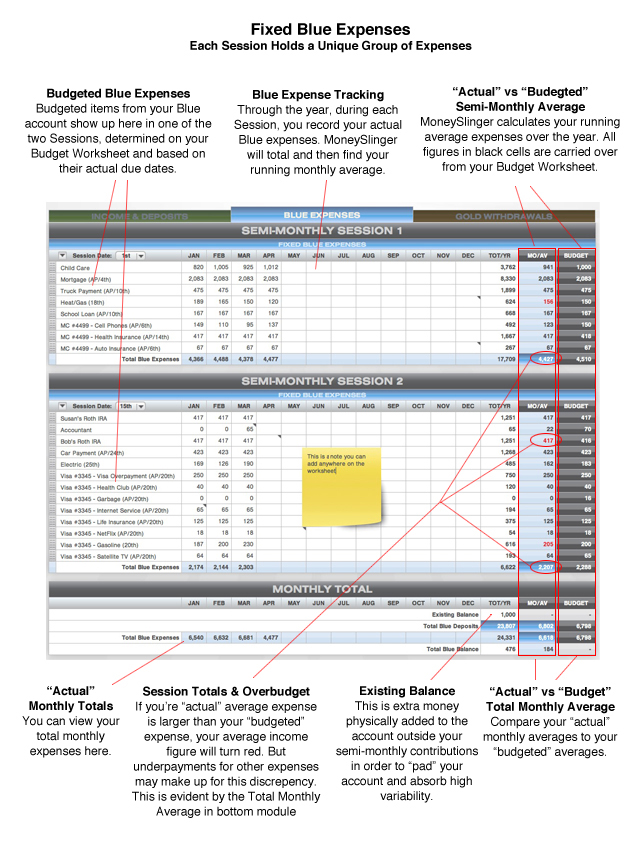
Blue Expense Worksheet details
There are a few notable differences with the Fixed Blue Expense Worksheet versus the Income & Deposit Worksheet. While both of these Worksheets are representing two semi-monthly Sessions, you’ll notice that each Session on the Income & Deposit Worksheet represents exactly half of an entire month’s deposits. Note the right column heading on the Income & Deposit Worksheet says Semi-Monthly (S-MO/AV).
By comparison, the Fixed Blue Expense Worksheet, while still broken into two Sessions, actually represents a separate expense grouping in each module (the Session groupings are determined on the Budget Worksheet). So by comparison here, you’re not necessarily paying out exactly a half month’s expenses at each Session.
When making Blue expense payments, you most likely will be paying out more in one Session and less in the other Session. But, when you total these Sessions, it still represents a total monthly average expense, shown in the Total Monthly module at the bottom.
Starting your Sessions
The take away here is, using the Demo Budget as an example, you’ll be depositing the same amount to the Blue Account during each semi-monthly Session, while at the same time paying out more than your deposit for the first Session (in this instance), and then paying out less than your deposit for the second Session. These alternating payout amounts are normal and follow the same routine month after month.
This works out fine but you must start MoneySlinger on the Session with the lesser payout. Since you’ll be depositing more than your payout for that Session, the balance of that unused deposit sits in the dedicated Blue Account and will cover you for the next Session deposit, which then has the larger payout. At this point the common deposit amounts and alternating payout amounts are invisible, except the balance in your Blue Account will simply alternate.
Padding your Accounts
Now keep in mind, the Blue Account balance should never go to zero. You always need extra money in this account to absorb or “pad” typical over and under payments that we’ve just explained. To start the system, you normally add this “extra” money into this account two different ways:
- By increasing your deposit amounts over your scheduled budget amount (for a limited time), or
- Deposit additional money “off budget” by using money from your savings account and enter that amount in the “Existing Balance” cell in the lower right corner. This is done separately from your routine deposits so the balance on this Worksheet matches your checkbook balance. It’s also so you know exactly what your real deposit figures are averaging and you’re meeting your budget expenses without the extra money you deposited separately to pad the account.
This will help get the system started and you won’t have to worry about becoming overdrawn.
Or, if you do not have extra dollars to pad the account right away, just increase your starting deposits (above your budgeted amount) into your Blue Account during your Income & Deposit Sessions. When you’re comfortable that you have a safe balance in the Blue account, you can reduce your deposits back to the original budgeted amount.
Your checkbook balance may or may not match your Blue Worksheet balance exactly. But we’re not so concerned with bank account reconciliation as we are with cash flow management. This does not effect MoneySlinger’s effectiveness. This is not that important, because we are rounding numbers and working with averages. But it should be pretty close. Any problems should be easy to spot in the individual expense figures you’re recording.