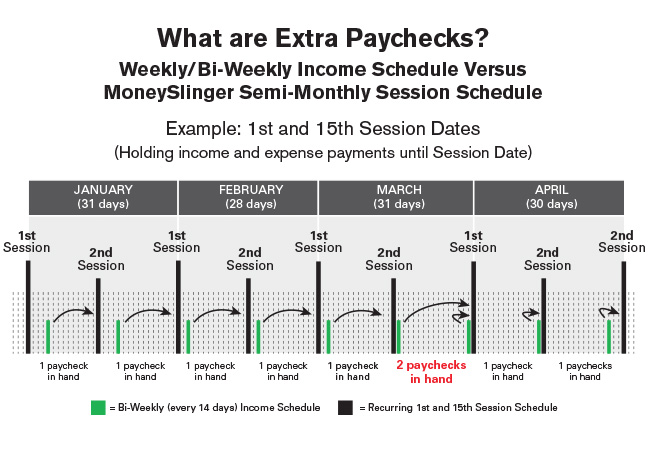
The chart above shows a bi-weekly incoming cashflow timeline (green bars every 14 days) and how incompatible it is with a monthly timeline, in which outgoing cashflow (expenses) are normally on.
This, is the core cashflow problem MoneySlinger resolves; incoming and outgoing cashflow variability. This incompatibility is an issue with any other income schedule that is not monthly (or semi-monthly).
Solving this problem is a major step that streamlines your budgeting and cashflow management efforts.
YOUR NEW, SEMI-MONTHLY CASHFLOW SCHEDULE
The thick black vertical bars in this chart represent your new, semi-monthly money management schedule (deposit/expense tracking). Two times per month you perform routine tasks, called a Session. You do this on a semi-monthly schedule because most, if not all your expenses, are on a monthly payment schedule. We just cut that monthly schedule into two half-months for easy, routine management.
You’re setting yourself up on a semi-monthly schedule for a reason; so your car payment (or any budgeted expense) is always due the same amount of days forward from your Session date. This is important. You can’t accomplish this if you base your money management schedule on a weekly timeline. Our goal is nail down a repetitive routine, that is always the same, reducing calculation and cashflow guessing games to zero.
Each Session sets you up financially until the next Session.
The Sessions above in this example are scheduled on the 1st and 15th, and are determined primarily by grouping expenses by their due dates so you know when you’ll have most in hand to make payments all at one time. Download the Quick Start Guide for more details. We are striving to have all/most of your money management efforts to be completed at one time within each semi-monthly Session.
Since each Session sets you up financially until the next Session, your new, routine money management task in between Sessions, is to simply collect and hold all income and expenses as they come in, until the next Session, when you then make your routine deposits, and pay/track your routine expenses.
It’s all one task, done at one time, while refining any small inconsistencies with one master calculation. It cannot be any simpler or faster, by any measurement.
To do that, we need to determine the correct income amount you’ll have “in hand on average” at each, or at least at most, semi-monthly Sessions.
This is the ENTIRE objective of MoneySlinger;
to synchronize your time and money to eliminate
chaos in your cashflow once and for all.
THE BI-WEEKLY INCOME SCHEDULE
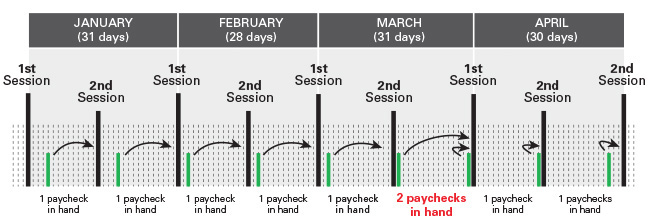
The green vertical bars in the image above show an example of a bi-weekly time/income schedule, as it relates to a monthly time/expense schedule. Note the bi-weekly INCOMING cashflow schedule is out of sync with the monthly/semi-monthly OUTGOING cashflow schedule. Days, weeks, months are all incompatible timelines if unmanaged.
Note each green bar represents one paycheck paid every 2 weeks (bi-weekly). You’ll notice that within each semi-monthly period you’ll usually have only one paycheck arrive, that you’ll hold until your scheduled Session. That works until the second Session in March (in this example). At this time you see you’ll have two checks in hand.
But if you’re paid every week, you would normally have two checks in hand at each Session, and so you would then find you have three checks in hand on the second Session in March.
This will happen twice per year.
While MoneySlinger averages your total annual income into a nice, neat, fixed, average semi-monthly amount, where there are 24 periods per year, the fact is, we can’t take those extra paychecks that only show up a few times a year, and include them into this calculation that determines a final semi-monthly deposit figure.
You just won’t have the fraction of that money MoneySlinger thinks you’ll have at each Session.
So, you adjust your semi-monthly income figure to match the reality, that you’ll really only have one check in hand most of the time, as you see in the chart above (or two checks in hand if paid weekly) for each Session.
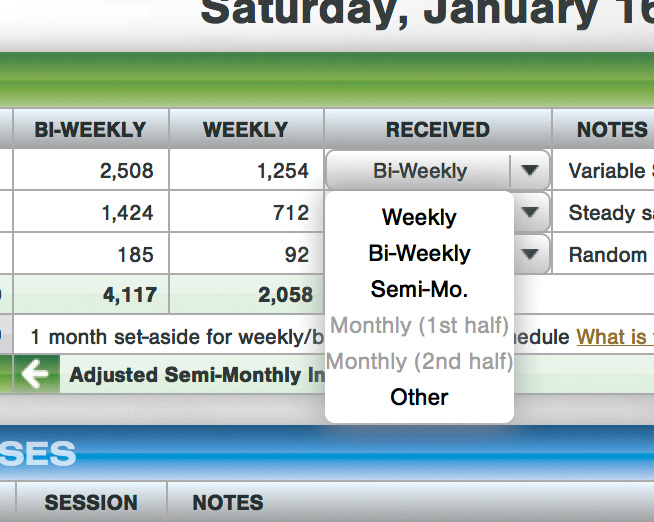
To correct this, choose either “Weekly” or “Bi-Weekly” in the RECEIVED column for any particular income row, MoneySlinger will calculate and remove these “extra paycheck” amounts, that you’ll see subtracted in the gray income area. This will adjust your SEMI-MONTHLY income amount accordingly… and should more closely match what you’ll really have in hand at the time of each Session.
Remember, this average semi-monthly income figure is what you’re budgeting your expenses against just below, on your Budget Worksheet.
WHAT TO DO WHEN THE EXTRA PAYCHECKS COME IN
These “extra check” amounts are still budgeted/managed, but only as they come in, outside your regular Semi-Monthly Session.

So, if you have weekly or bi-weekly income, or other lump sum income a few times a year) create an extra income row called “Extra Weekly/Bi-Weekly Paychecks & Income” (seen on Demo Budget). KEEP THESE INCOME FIELDS BLANK. Do not fill in any amounts. For safety choose “Other” in the RECEIVED column so there is no further calculation. You can even make note of the estimated income amount in the Note field on far right.
We add this row here because it will create an income row on your Income & Deposit Worksheet (seen below), so you can track that income (or any extra income) that comes in during the year outside of your regular, budgeted semi-monthly figures.
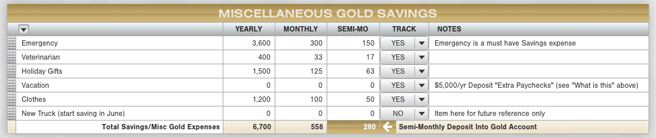
Now, to budget and plan forward with these extra paychecks/income, you create a budget item (anywhere), for instance in your Gold Savings area, as we did here on the Demo Budget for “Vacation”. Note we did not enter figures directly into the columns again, but off to the side in the Notes field, we estimated the value we budgeted for using those extra paychecks (or any other anticipated income expected to randomly appear within the year).
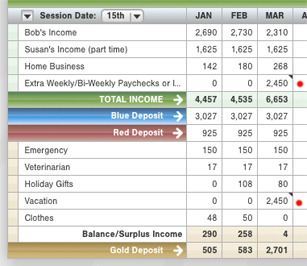
Then, during a Session, when you find yourself with these extra paychecks or other income in hand during the year, record that income on your Income & Deposit Tracking Worksheet (seen above) in the appropriate Extra Income row.
Then, when fine tuning your deposits using your master calculator, that money may be put toward your Vacation as seen above per your plan, or toward your Emergency Fund, or even divided up and some added to your Blue Account to make a one-time larger payment to pay down debt this particular Session, or for whatever reason you determined.
Do you see how easily flexible managing your cashflow is using MoneySlinger? And all income is accounted for and totaled for the year.