
Budget and Planning
Estimate and Balance Your Income and Expenses
Warning: At this time we cannot guarantee full application functionality using
Windows 10 with Internet Explorer (IE). You may loose data and your hard work.
Download faster/better alternative browsers from homepage.
(Right click on a row to add/delete rows, or hold “Control” and click on a row to add/delete)
Questions? Please email.
The ultimate objective of MoneySlinger is to manipulate your entire cash flow schedule into a semi-monthly routine. This repetitive task done twice a month is called a Session using 4 semi-monthly budget figures.
Your Budget Worksheet is your master worksheet. The budget items and figures you enter on this Budget Worksheet determines what figures show up on the Green, Blue and Gold Tracking Worksheets you’ll use for your Sessions.
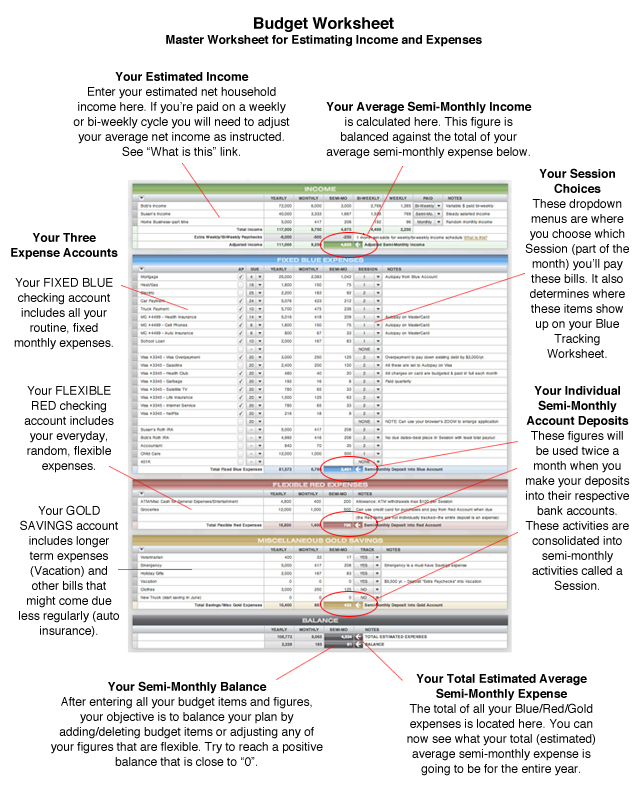
The Budget Worksheet is used first to discover your fixed, average semi-monthly incoming and outgoing cash flow figures for each color group. But it’s also used to balance your estimated income against your estimated expenses. You do this by attempting to get as close to a “0” balance at the bottom of the Worksheet.
NOTE: When you’re first starting the budgeting process, keep in mind that it’s best to underestimate your income and overestimate your expenses. You can very easily tighten up the “spread” between these two figures in the future by adjusting your budget figures closer to your actuals after you get a few months of MoneySlinger under your belt. Just right click on any row to add or delete rows.
Income
Itemize each income source on its own line and estimate your income for each. Right click to add more rows or delete rows.
NOTE: No matter what your individual income cash flow schedules may be on now, using MoneySlinger you’ll ultimately be holding and collecting your income as it arrives, and then voluntarily bringing this money into your life on your own semi-monthly cash flow schedule. This is possible because MoneySlinger sets you up financially at each semi-monthly money management Session until the the next Session, so there’s no need to be concerned about any money that may have physically arrived in between your Sessions. The same goes for virtually all your expenses.
Expenses
The next objective of the this Budget Worksheet is to find your fixed, average semi-monthly expense. But you must first consolidate and group all your expenses into one of three groups known as the Blue, Red and Gold Accounts. If you review the Demo Budget expense items it should be evident where expenses should be categorized, although there are no hard rules.
The Fixed Blue Expense Account contains the known expenses that are mostly due on a monthly schedule. You’ll be paying out and tracking these expenses during each semi-monthly Session during the year.
The Flexible Red Expense Account is for discretionary expenses (meaning the amount is flexible and can be determined at the time of expenditure). You don’t track these expenses beyond the balance in the account (more below on this).
The Miscellaneous Gold Savings Account is for more long-term expenses, of which many are self-imposed, such as Emergency or Vacation. You’ll be tracking these occasional expenses also during your Sessions.
Separate Expense Bank Accounts
Key to the MoneySlinger system are dedicated bank accounts for each of the three expense groups (Blue/Red/Gold). The average semi-monthly expense figure for each of these Accounts, which the Budget Worksheet has calculated for you, will be the Semi-Monthly Deposit into that particular bank account during your semi-monthly Session activities. Same figures. Same semi-monthly schedule.
Benefits of Averages and Dedicated Accounts
While you’ll be making three routine and fixed figure deposits at each Session into each of the Blue/Red/Gold Accounts, you’ll also be paying out numerous, variable expenses from each too. For the Blue Account, you’ll be paying out monthly recurring expenses at each Session, while only occasionally making withdrawals from the Gold Account. The Red Account deposit is simply considered one large expense, and you’ll be drawing on that account in between your Sessions for everyday living needs.
While MoneySlinger tracks these individual expenses, it does so, so it can calculate your total “average expense” compared to your total “average deposit”. Once you do this a few times, you’ll begin to understand that you don’t need to be all that concerned with all those individual variable expenses any more…just those three fixed deposits.
By managing your cash flow this way, you’ve just eliminated about 50% of the typical financial calculations that everyone else is stuck doing. By consolidating your expenses into groups and using dedicated bank accounts, you have leveraged the power of averages by identifying and simply contributing one “total average expense” and letting your bank account absorb all the individual week-to-week and month-to-month variability.
The Red Account Explained
As mentioned already, the Red Account is not tracked beyond the balance in your account. People have a hard time with this fact.
So, consider this: You’ve budgeted for all your current living expenses, retirement expenses, vacation expenses, college expenses–every expense that has anything to do with your current living situation, even your long-term life goals, in the Blue and Gold Accounts. Now, beyond the total lump sum of money allocated to the Flexible Red Account, does it really matter if you track how much toothpaste you bought last week from the Red Account? Or even how much you spent on food or how many times you ate out?
You see, this is another great benefit of having dedicated accounts. By keeping all your “fixed” expenses separated from your everyday “flexible” living expenses, all you need to know in order to manage your flexible money is three things: are your Blue and Gold deposits meeting your fixed expenses, what the balance is in your Red Account, and your next Session Date.
That’s it. If you know these three things (and you instinctively will), you simply don’t overspend more than what’s in your Red checking account before it’s replenished at your next semi-monthly Session. There’s absolutely no need to track, record and study minute expenditures from the Red Account. How much time, energy and calculation are you saving now while still having complete control of your cash flow?
But there’s yet another MoneySlinger benefit in the Red Account
If you spend less than what you’re allocated in the Red Account before your next scheduled Session, any remaining balance rolls over and continues to accumulate in your Red Account. In other words, if you’re being conservative in your spending over time, you’re continually being rewarded with an accumulating balance. So you can safely splurge when the time is right with absolutely no calculation or second guessing needed. You can overspend because you’ve underspent. You just need to make sure you can financially survive to the next semi-monthly Session.
With that said, any expense you desire to track can be moved to either the Blue or Gold Accounts.
Note: planned for the Red Account is a mobile app so multiple people can independently draw on this one Account while always knowing the immediate, adjusted MoneySlinger balance.